Document Control Mistakes That Create Compliance Risk (And How to Fix Them)
Document control is one of the most audited functions in regulated healthcare and life sciences — and one of the most consistently mismanaged. Not because quality teams don't understand its importance, but because the tools most organizations use to manage it were never built for the regulatory environment they're operating in.
SharePoint was built for collaboration. Shared drives were built for file storage. Email was built for communication. None of them were built for controlled document management in an FDA-regulated, ISO 13485-certified, or AABB-accredited organization — and the gap between what those tools do and what your quality system requires is exactly where audit findings live.
These are the document control mistakes that show up repeatedly in FDA 483 observations, warning letters, and third-party audit reports. Most of them aren't failures of intent. They're failures of infrastructure.
Mistake 1: Using Version Numbers Without Version Enforcement
The most common document control mistake in regulated organizations isn't keeping the wrong version — it's having the right version in the system while staff work from the wrong one on the floor.
Version naming conventions (v1.0, v2.3, Rev C) are not version control. They're version labeling. The distinction matters enormously in a regulatory context. Labeling tells you which version exists. Control prevents unauthorized versions from being used.
21 CFR Part 820.40 is explicit: obsolete documents must be promptly removed from all points of use or otherwise prevented from unintended use. ISO 13485 Section 4.2.4 carries the same requirement. The regulatory expectation isn't that you can identify which version is current — it's that your system makes it structurally impossible to work from an outdated one.
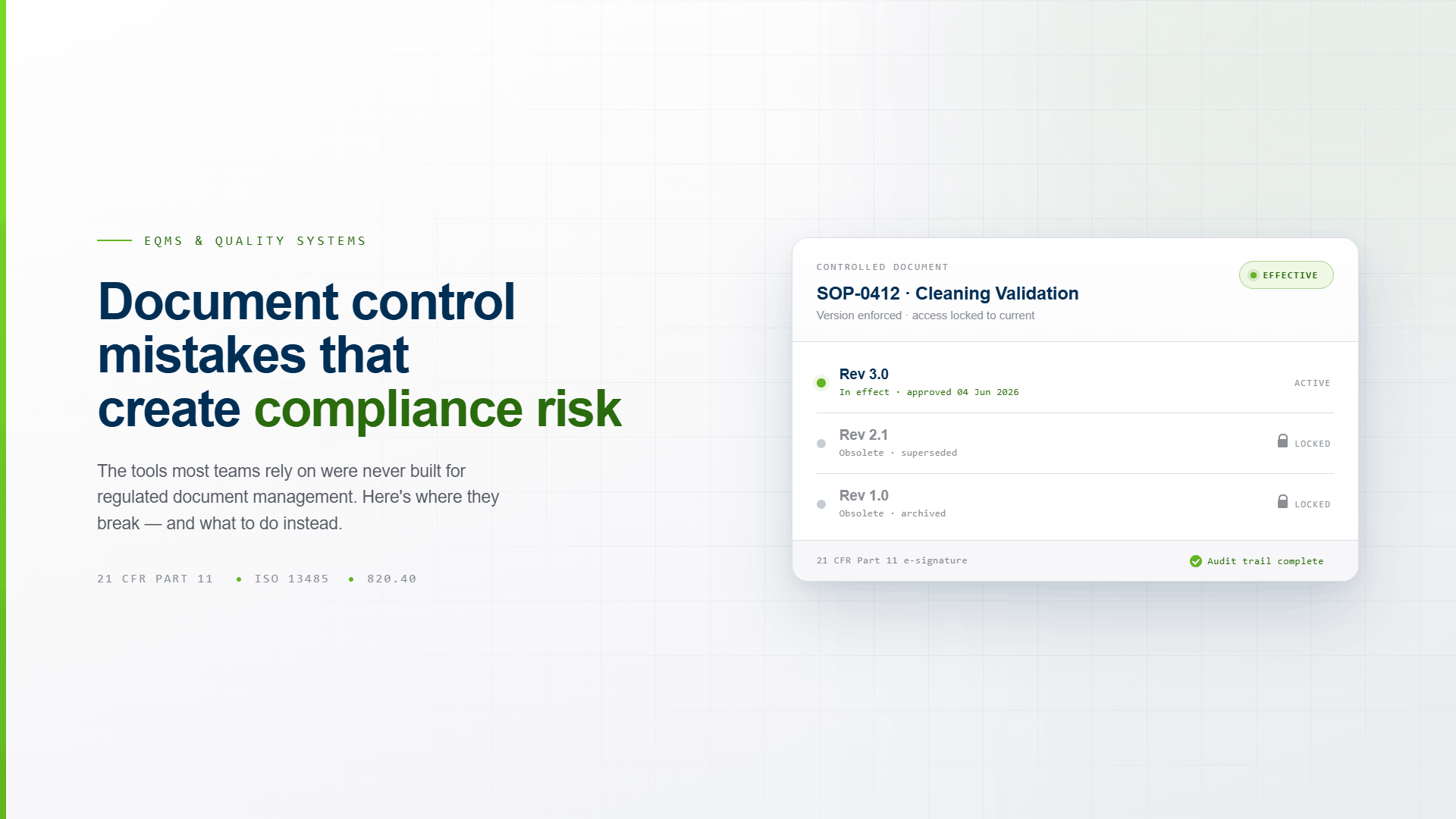
What version enforcement actually requires: when a new document version is approved and goes effective, the previous version must be automatically locked from active use system-wide — not just marked as superseded in a folder somewhere. Staff should be unable to access an obsolete SOP for production use without a documented exception process. That's control. A shared drive where the old version is still technically accessible is not.
The audit risk: A process deviation investigated against the wrong SOP version creates a compliance gap that's difficult to close after the fact. "Staff used the correct procedure" is not a defense if your system can't prove which version was in effect at the time the work was performed.
Mistake 2: Approval Chains That Live in Email
Email approval is the default document control workflow for organizations that haven't implemented a formal QMS — and for a lot of organizations that technically have one but haven't changed the actual routing process.
The problems with email-based approval are structural. Email doesn't capture the approver's identity in a legally defensible way. It doesn't time-stamp approvals against the correct document version. It doesn't enforce the approval sequence. It doesn't prevent a document from being edited after it's been reviewed. And it doesn't generate an audit trail that satisfies 21 CFR Part 11's requirements for electronic records — which means every approval that happened over email is a record that regulators may not accept as compliant.
21 CFR Part 11 requires that electronic signatures be unique to one individual, applied under the individual's direct supervision, and linked to their electronic records in a way that cannot be excised, copied, or transferred. An email reply is none of those things.
Beyond the regulatory exposure, email approval creates operational problems that compound over time. Approval chains get lost. Reviewers respond to the wrong version. The final approved document and the email chain that approved it exist in different places, maintained by different people, with no automated link between them. When an auditor asks to see the complete approval record for a document — every reviewer, every revision, every signature, and the date and time of each — reconstructing that from an email archive is expensive, error-prone, and often incomplete.
What compliant approval looks like: Routing that is initiated by the system, not by a person. Approvals captured with 21 CFR Part 11-compliant e-signatures that include meaning, date, and time. A complete, immutable audit trail that links the approval record to the exact document version it approved — automatically, without manual assembly.
Mistake 3: Training Records That Aren't Linked to Document Versions
This is the document control failure that most organizations don't discover until they're in an inspection and an auditor asks a question that seems simple on the surface: "Can you show me that every staff member who performed this procedure was trained on the version that was in effect at the time?"
If your training records and your document control records are in separate systems — or even in the same system without a hard link between them — that question takes time to answer. Often a lot of time. And time spent reconstructing a training-to-document-version linkage under inspection pressure is time spent in exactly the scenario regulators are most likely to probe further.
The regulatory requirement here isn't just that training was completed. It's that the right training was completed on the right version at the right time. FDA quality system regulations and ISO 13485 both require that personnel performing quality-affecting functions are appropriately trained and that the training is documented. "Appropriately trained" means trained on the current version of the relevant procedure — not a version from two revisions ago.
The structural fix requires that document control and training management share the same data model. When a document is revised, the system should automatically identify which staff members need retraining based on their role and the scope of the change, generate the training assignment, notify the relevant personnel, and create a linked record that connects the training completion to the specific document version it covered. That linkage needs to be automated — not maintained manually across two systems that don't communicate.
The downstream risk: A deviation or adverse event triggers an investigation. The investigation requires you to demonstrate that the staff involved were trained on the current SOP at the time the work was performed. If you can't produce that linkage quickly, the documentation gap becomes part of the finding.
Mistake 4: No Periodic Review Process — Or One That Isn't Enforced
Regulated organizations are required to review controlled documents periodically to confirm they remain current, accurate, and appropriate for their intended use. FDA 21 CFR Part 820, ISO 13485, GxP frameworks, and most accreditation bodies specify this requirement. The review interval is typically defined in the organization's own quality procedures — usually annually, sometimes every two to three years depending on document criticality.
The mistake isn't usually failing to define a periodic review schedule. It's failing to enforce it. Documents get approved and go into the controlled repository, and without an automated reminder system, periodic reviews get deferred indefinitely. The SOP written for a process that has since changed stays in the active library, technically current, actually obsolete.
The consequences show up in two places. The first is audit findings — a document that hasn't been reviewed in four years is a red flag for any assessor, regardless of whether the procedure itself is still accurate. The second is operational risk — a procedure that doesn't reflect current practice is a gap between your documented quality system and your actual quality system. That gap is exactly what CAPA investigations and root cause analyses are supposed to surface, and finding it during an inspection is worse than finding it during an internal audit.
Periodic review needs to be scheduled, tracked, and enforced by the system. Not by a calendar reminder in someone's email.
Mistake 5: Treating Document Control as a Storage Problem Instead of a Process Problem
This is the root mistake that enables all the others. Organizations that think of document control as a filing system — a place to put controlled documents so they can be found — will consistently underinvest in the process infrastructure that makes document control actually work.
The filing system framing leads to SharePoint implementations that store the right versions but don't enforce them. It leads to naming conventions that communicate version status without controlling access. It leads to approval processes that live in email because the system's job is storage, not workflow. And it leads to training records that exist in a separate system because training management is a different problem.
Document control in a regulated organization isn't a storage problem. It's a process control problem. The question isn't "where do we keep our documents?" It's "how does our system ensure the right people are using the right version of the right document at the right time — and how does it prove that to a regulator?"
That question requires a system designed around process control: automated routing, enforced version transitions, mandatory training linkage, e-signature-compliant approvals, and an audit trail that reconstructs the complete compliance picture for any document at any point in its lifecycle — without manual effort.
The infrastructure gap: Most organizations using SharePoint, shared drives, or legacy document management tools are solving the storage problem. They know where their documents are. What they can't demonstrate efficiently under inspection is the process control picture — who was trained, on which version, when, for which procedures, linked to which quality events. That's the demonstration regulated environments are actually required to make.
What Compliant Document Control Actually Requires
The regulatory baseline for document control in most regulated healthcare and life sciences environments covers these functional requirements:
Version control with enforcement. Obsolete documents must be prevented from unintended use — not just labeled as superseded. The system must make the current approved version the only accessible version for production use.
Compliant e-signatures. Approval signatures must satisfy 21 CFR Part 11 or Annex 11 requirements: unique to the signer, linked to the specific record version, with captured meaning and timestamp.
Training linkage. Every document change must generate a training event for affected personnel, and every training completion must be linked to the document version it covered.
Complete audit trail. The full history of every document — every version, every approval, every change justification, every training acknowledgment, every related quality event — must be retrievable in a single search. Not reconstructed across multiple systems.
Periodic review enforcement. Review schedules must be tracked and enforced by the system, with completed reviews documented in the record.
Downstream connections. Documents don't exist in isolation. A document revision may require a CAPA update, a deviation re-investigation, a risk assessment review, or a supplier qualification review. Your document control system needs to surface those connections automatically.
If your current document management infrastructure doesn't deliver all of these, you have structural gaps that aren't going to close themselves — and that will eventually surface in an audit finding, a deviation, or a regulatory action.
Fixing Document Control Doesn't Require Starting Over
Most organizations don't need to throw out their existing document library. They need a controlled environment to put it in — one that enforces the process requirements their current tools were never designed for.
The migration path is typically straightforward: existing documents are imported into a controlled repository, version history is established, approval workflows are configured for the organization's regulatory environment, and training linkage is activated. The documents don't change. The infrastructure around them does.
What changes operationally is what quality teams spend their time on. Instead of manually tracking who's been trained on which version of which SOP, the system tracks it automatically and flags gaps before they become findings. Instead of assembling audit evidence from multiple systems, the audit trail is already built — searchable, complete, and reconstructable in seconds. Instead of chasing approvals over email, routing is enforced by the system and every signature is captured in the record.
That's what document control is supposed to do. And it's achievable without a multi-year implementation project.
See what controlled document management looks like in practice. Kintavo Document Control handles version enforcement, compliant e-signatures, automatic training linkage, and full audit trail — purpose-built for regulated healthcare and life sciences.
Related: