Change Control
Every change documented, assessed, and approved.
Impact assessments that actually see your system — proposed changes list every affected document, training record, and validation before approval.
An Undocumented Change Is a Deviation Waiting to Be Discovered.
Changes happen everywhere: a supplier substitutes a component, a method parameter drifts, an instrument is replaced. Managed by email, half of them are assessed after implementation — and some are discovered by an auditor comparing records, which converts a routine change into a finding about your quality system itself.
The expensive part is not the paperwork. It is the unassessed downstream impact: the SOP that still describes the old method, the training nobody assigned, the validation that quietly lapsed.
What ICH Q10, ISO 13485, and Part 820 Require From Change Control
ICH Q10 names change management as one of four pillars of the pharmaceutical quality system — proposed changes evaluated, approved by dedicated authority, and reviewed after implementation. ISO 13485 and Part 820 require design and process changes to be verified or validated, and documented before implementation. EU GMP chapter 1 expects the same discipline for any change that could affect product quality.
An email chain meets none of these. Kintavo meets all of them by construction — impact assessment, routed approval, and verified action items are the workflow, not an attachment to it.
The old way, retired.
This is the actual screen.
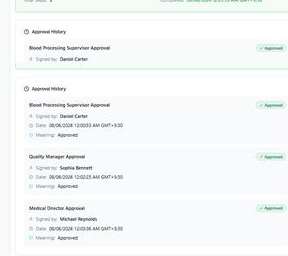
Assessed Before. Verified After. Signed Throughout.
A reagent supplier discontinues a component. The lab manager opens a change request; classification lands it as major. The guided assessment flags two SOPs, a validation protocol, and six people needing training. Approvals route to quality and the medical director. Each action item is an owned task; the change cannot close until all verify. Three months later, the scheduled review confirms QC performance held — with the control chart attached.
Part of one connected system.
Change Control shares the same data model, AI engine, and audit trail as the other eighteen modules — so its records see, and are seen by, everything else in your quality system.
Change Control FAQ
Can change control gate on validation status?
Yes. Action items include verification and validation tasks, and the change cannot close until they are complete and signed — so nothing goes live unvalidated.
How does Kintavo prevent changes before approval?
Timestamps and workflow. Implementation tasks are not released until approvals complete, and the record shows the sequence — which is exactly what an auditor checks.
Does a change automatically update affected documents and training?
The guided assessment identifies them, and closing the change requires the linked SOP revisions and training assignments to be complete. Nothing depends on someone remembering.
Can we configure our own change categories and routes?
Yes — categories, approval matrices, and assessment checklists are configured to your SOPs by your own team in the Workflow Builder.